

 Home
HomePowered by Turnkey
Teams managing high-value contracts use Turnkey for policy-enforced signing at every stage:- Polymarket transitioned to Turnkey for secure contract interactions at scale, including Safe deployment and gasless trading infrastructure.
- Brale uses Turnkey’s policy engine to constrain stablecoin minting and transfer operations to an allowlist of approved contracts.
Key implementation decisions
Example: stablecoins and RWAs
Stablecoins and tokenized Real-World Assets often secure billions of dollars in value. These contracts typically involve minting, burning, pausing, and upgrades, each requiring different levels of authorization.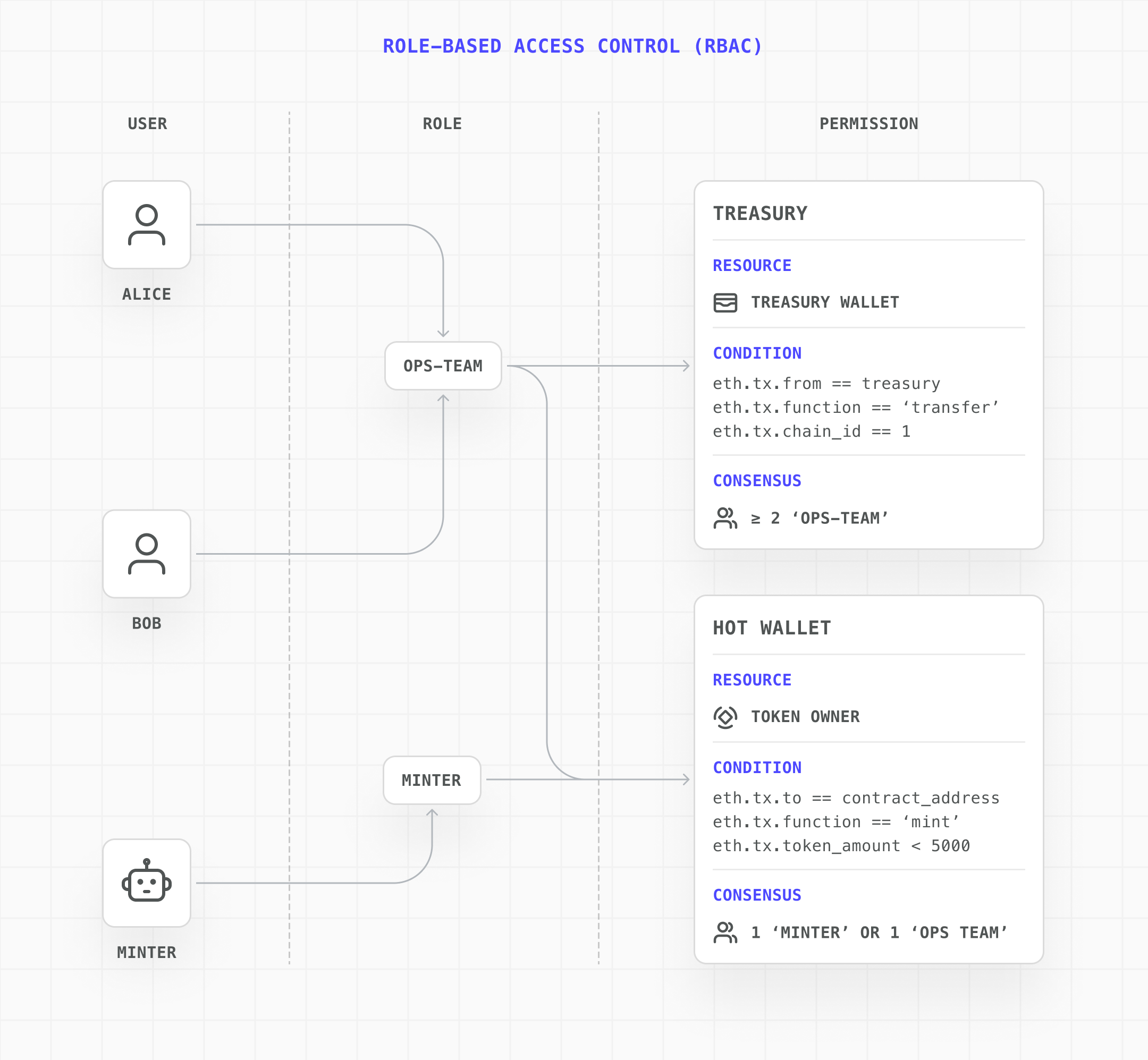
Implementation steps
This guide assumes you’ve completed the Quickstart and have a Turnkey client initialized. If not, start there first.
1
Permissioned contract deployment
Deployment is strictly permissioned. A designated deployer user must have a policy that explicitly grants them permission to sign the deployment transaction for a specific wallet and network.The
eth.tx.to == '' condition matches contract creation transactions (where the to field is empty). Combined with a chain ID constraint, this ensures the deployer can only deploy on the intended network.2
Function-level interaction policies
Once deployed, interactions like minting new token supply are governed by precise policies. For example, a minting policy can be configured to:The
- Allow a specific operator user to sign
- Require the transaction to originate from a designated wallet
- Target the deployed contract’s exact address
- Call only the
mintfunction
0x40c10f19 value is the function selector for mint(address,uint256). For production use, the recommended approach is to upload the contract ABI so policies can reference function names and constrain arguments directly (e.g., bounding mint amounts or requiring multi-party approval above a threshold).3
Safe contract upgrades
Upgrading a contract redirects the underlying implementation logic, making it one of the most sensitive operations. Turnkey minimizes the risk window:The
- Designate a specific upgrade owner wallet (separate from the operator wallet).
- Create a temporary, highly restrictive policy only when an upgrade is needed, granting the upgrade owner permission to sign the upgrade transaction.
- Once the upgrade is complete, remove the policy. The wallet remains dormant and secured until the next upgrade.
0x3659cfe6 selector matches upgradeTo(address). After the upgrade completes, delete this policy to close the window.